AI Agents Need Better Prompts: Why Prompt Management Matters in an Agentic World
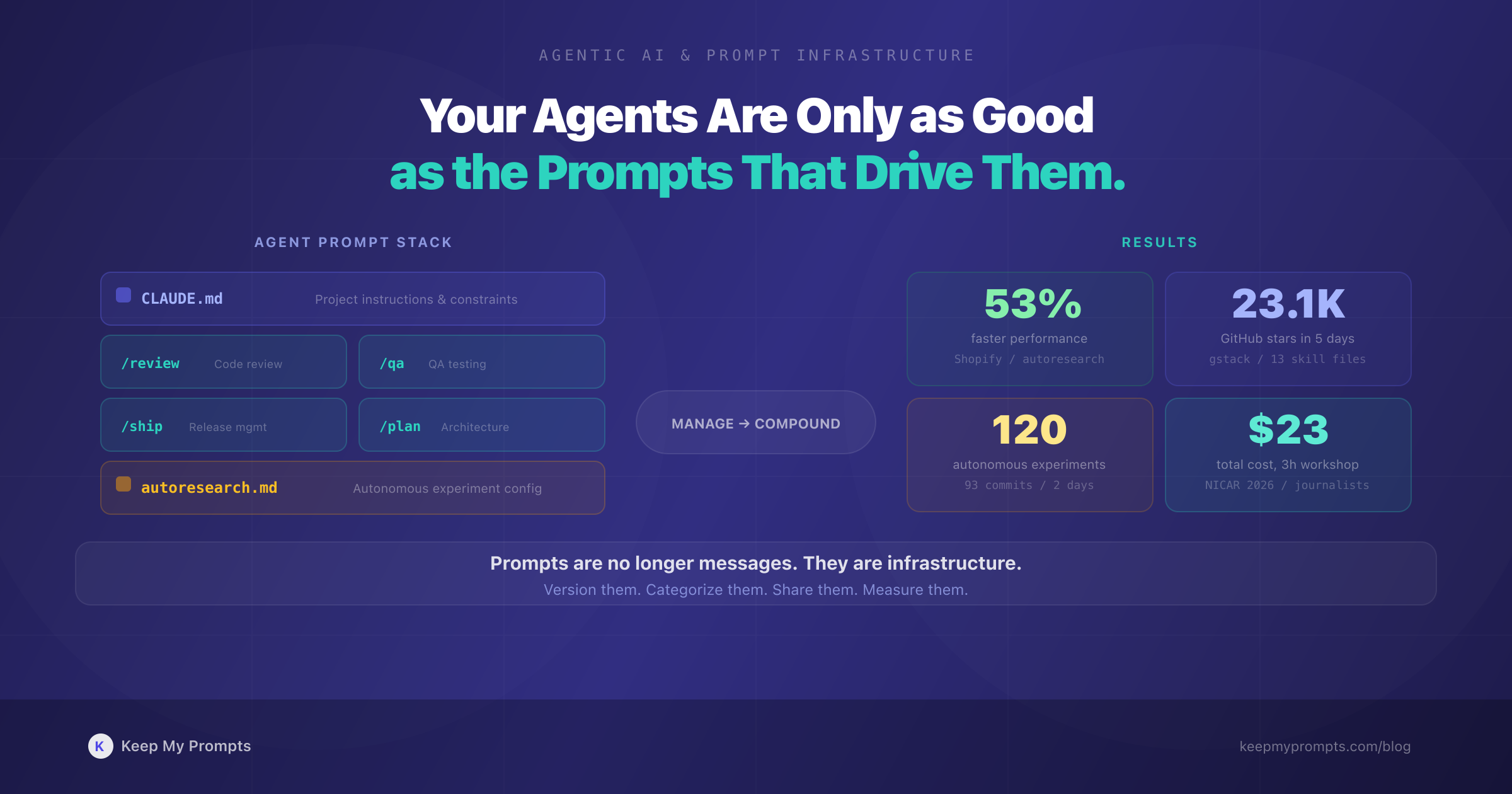
On March 12, 2026, Y Combinator CEO Garry Tan open-sourced a repository called gstack: a collection of 13 specialized prompt files that simulate an entire engineering organization inside Claude Code [1]. Within five days, the repository had accumulated 23,100 GitHub stars and 2,700 forks [2]. The reaction was polarized. Supporters called it a glimpse of the future; critics dismissed it as "a bunch of prompts in a text file" [2].
Both sides missed the point.
The same week, Shopify CEO Tobi Lutke revealed that a coding agent, guided by a single autoresearch.md prompt file and a test suite, had produced 93 commits across 120 automated experiments, achieving a 53% performance improvement on Liquid, Shopify's 20-year-old template engine [3]. The codebase had been optimized by hundreds of contributors over two decades. A prompt file and an afternoon did what years of incremental tuning had not.
These are not isolated events. They signal a structural shift in how professionals interact with AI. We are moving from a world where prompts are typed once and forgotten to one where prompts are infrastructure: versioned, shared, specialized, and critical to outcomes. The rise of AI agents, coding assistants that operate autonomously across multi-step workflows, makes this shift irreversible.
This article explores why agent-driven workflows demand a fundamentally different approach to prompt management, what that approach looks like in practice, and why the professionals who organize their prompts like engineers organize code will outperform those who do not.
1. From Chat to Agents: What Changed
1.1 The Conversational Era
For most of 2023 and 2024, interacting with AI meant typing a prompt into a chat window and receiving a response. The prompt was ephemeral. You might refine it across a few turns, but the interaction was fundamentally synchronous and disposable. If you wrote a great prompt for generating marketing copy, you might paste it again next week, or you might not remember it at all.
This model worked because the scope was limited. One prompt, one task, one response.
1.2 The Agentic Shift
In 2025 and 2026, the dominant interaction pattern shifted. AI coding agents like Claude Code, OpenAI Codex, Gemini CLI, and Mistral Vibe [4] introduced a different paradigm: you give the agent a goal, and it plans, executes, tests, and iterates autonomously, calling tools, reading files, running commands, and writing code across multiple steps.
The prompt is no longer a single instruction. It is a configuration layer that determines how the agent behaves across an entire workflow. Simon Willison, speaking at the Pragmatic Engineering Summit in March 2026, described a pivotal moment: "the moment where the agent writes more code than you do" [5]. For many professionals, that moment has already arrived.
1.3 The Scale of Adoption
The subagent pattern, where a primary agent delegates tasks to specialized sub-agents, is now supported across at least seven major tools: OpenAI Codex, Claude Code, Gemini CLI, Mistral Vibe, OpenCode, Visual Studio Code, and Cursor [4]. OpenAI's Codex introduced formal subagent support in March 2026, with three default agents ("explorer," "worker," "default") and the ability to define custom agents as TOML configuration files [4].
This is not a niche developer workflow. At NICAR 2026, a journalism conference, data journalists completed a three-hour workshop using coding agents to analyze a database of 200,000 San Francisco trees, generate interactive heat maps, and scrape web data. Total cost in API tokens: $23 [6].
2. The Anatomy of Agent Prompts
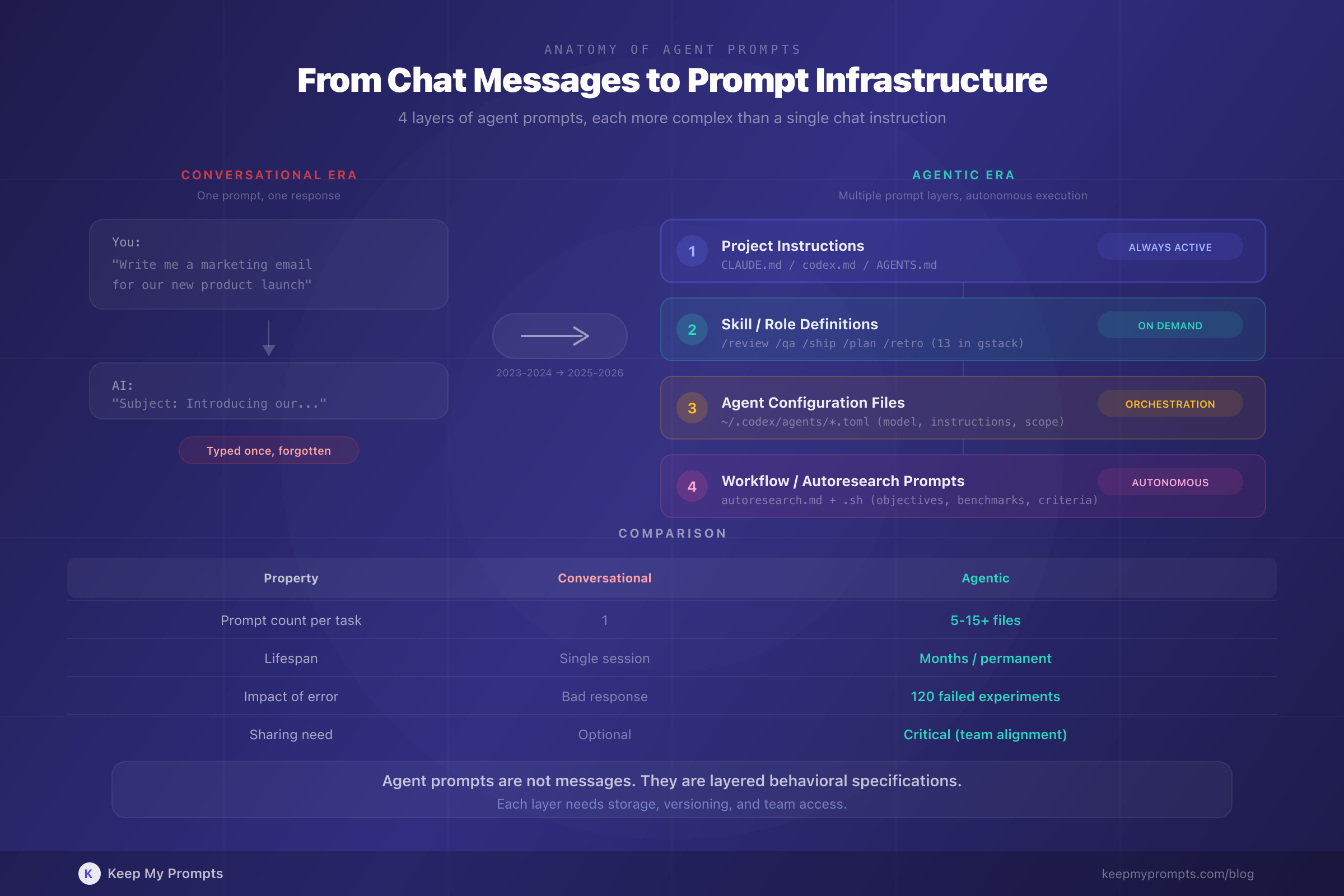
Agent prompts are structurally different from conversational prompts. Understanding this difference is essential for managing them effectively.
2.1 System Prompts and Project Instructions
Every agent session begins with a system prompt or project instruction file. In Claude Code, this is CLAUDE.md; in Codex, it is codex.md or AGENTS.md. These files define the agent's behavior, constraints, and knowledge of the project. They are the equivalent of onboarding documentation for a new team member, except the team member reads them perfectly every time.
Willison described his standard opening: "here's how to run the test, it's normally uv run pytest" followed by "use red-green TDD." He called it "five tokens" [5]. Those five tokens reliably trigger test-driven development behavior across an entire coding session. The economy of the instruction belies its impact.
2.2 Skill Files and Role Definitions
Garry Tan's gstack takes this further. Each of its 13 skills is a separate .md file stored in ~/.claude/skills/gstack/, referenced via the project's CLAUDE.md [1]. The skills encode organizational roles:
| Skill | Role |
|---|---|
/plan-ceo-review | Product strategy and vision |
/plan-eng-review | Architecture and technical planning |
/plan-design-review | Design audit (80-item checklist) |
/review | Code review and bug detection |
/qa | QA testing with bug fixes |
/ship | Release management and CI/CD |
/retro | Weekly metrics and retrospectives |
Each file is a prompt. Each prompt encodes a specialized behavior. Together, they simulate a team: strategy, design, engineering, code review, QA, release, documentation [1]. The 23,100 stars suggest the industry agrees this is valuable.
2.3 Agent Configuration Files
OpenAI Codex stores custom agent definitions as TOML files in ~/.codex/agents/, each specifying instructions and a model assignment [4]. A multi-agent prompt from their documentation reads:
"Investigate why the settings modal fails to save. Have browser_debugger reproduce it, code_mapper trace the responsible code path, and ui_fixer implement the smallest fix once the failure mode is clear." [4]
This is not a prompt you type once. It is a reusable workflow definition that coordinates three specialized agents. Losing it means reconstructing the entire orchestration from scratch.
2.4 Autoresearch Prompts
Shopify's approach represents yet another category. The autoresearch.md file, combined with autoresearch.sh, provided the agent with everything it needed to run 120 optimization experiments autonomously [3]. The prompt defined the objective, the benchmark methodology, the test commands, and the success criteria. State was maintained in autoresearch.jsonl.
The result: 53% faster parse and render, 61% fewer memory allocations [3]. The prompt file was the critical artifact. Without it, the agent would have had no framework for autonomous experimentation.
3. Why Agent Prompts Need Management
3.1 Proliferation
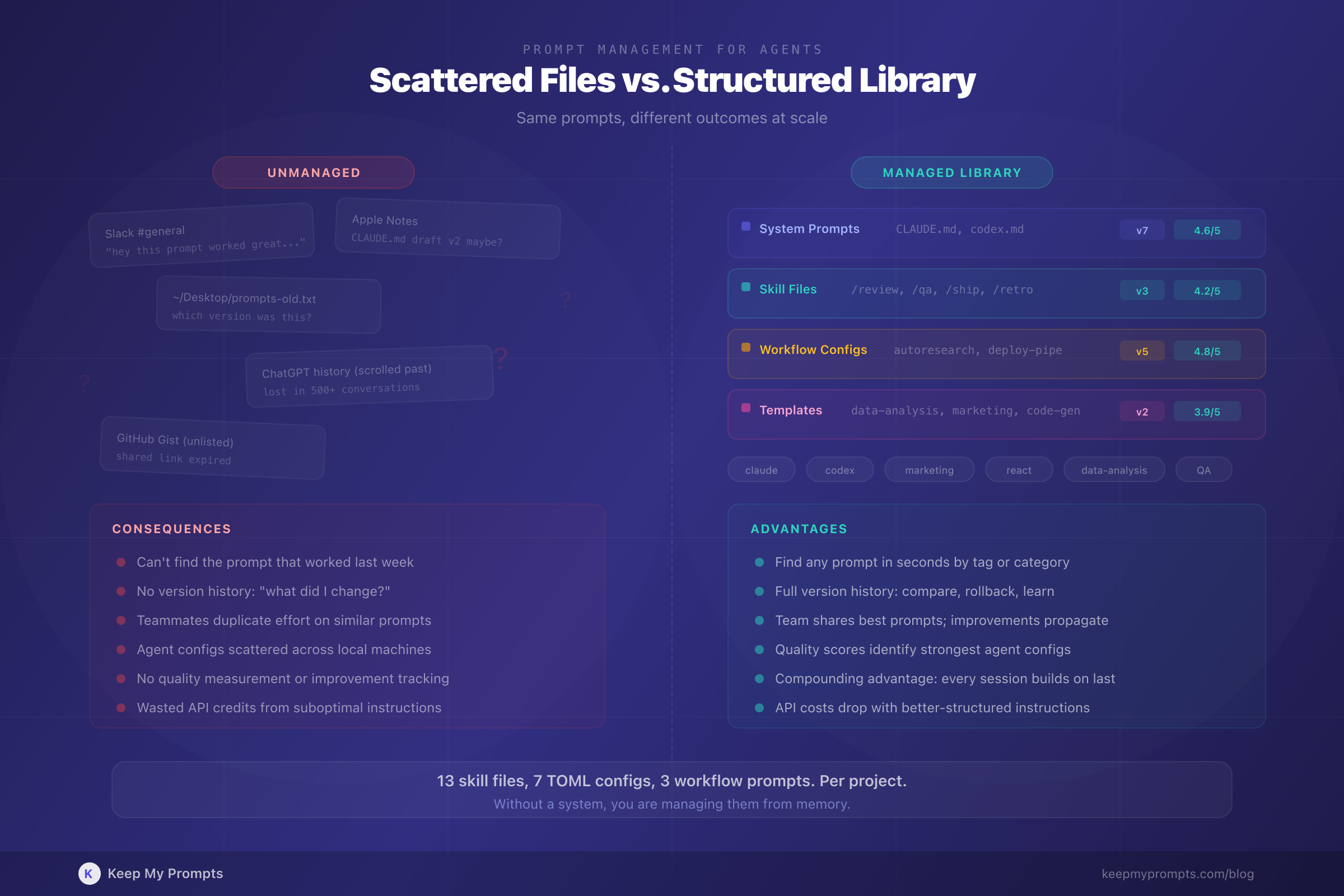
A single project using coding agents might now require:
- A
CLAUDE.mdorcodex.mdproject instruction file - Multiple skill or agent definition files (
.mdor.toml) - Autoresearch or workflow prompt files
- System prompts for different contexts (development, review, deployment)
- Prompt templates for recurring tasks
Garry Tan's setup involves 13 skill files [1]. A team using Codex with custom subagents might have a dozen TOML definitions. Each file is a prompt that shapes agent behavior. Each needs to be stored, versioned, and accessible when needed.
3.2 Versioning
Agent prompts evolve. Willison noted that coding agents "follow existing codebase patterns almost to a tee" [5], which means the instructions you give them at the start of a session compound over time. A small change to a system prompt, adding a testing instruction, switching a model assignment, adjusting a quality checklist, can produce dramatically different outcomes.
Without version history, you cannot answer the question: "What changed between the session that worked and the one that did not?"
This is the same problem software engineering solved with Git decades ago. Prompt versioning is the equivalent of source control for AI workflows. Tracking prompt changes over time is no longer optional when your prompts drive autonomous agents.
3.3 Team Sharing
When Shopify CEO Tobi Lutke mandated in April 2025 that "reflexive AI usage is now a baseline expectation" and that employees must justify why a task cannot be completed with AI before requesting additional resources [7], he created an organizational need for shared prompt infrastructure. Every team member needs access to the prompts that work, and those prompts need to be consistent.
Garry Tan's gstack is shareable by design: clone the repository, run setup, add a line to your CLAUDE.md [1]. But most teams do not publish their prompts as open-source repositories. They need internal systems for sharing agent configurations, skill files, and workflow prompts across team members.
3.4 The "Just Prompts" Fallacy
Critics of gstack argued it was "just prompts in a text file" [2]. This framing reveals a misunderstanding of what prompts have become. A CLAUDE.md file is not a chat message. It is a behavioral specification that determines how an autonomous system operates across hundreds of actions.
Dismissing prompt files as trivial is like dismissing configuration files as trivial. Both encode critical decisions. Both break things when they are wrong. Both need management.
4. Practical Guide: Managing Prompts for Agentic Workflows
4.1 Categorize by Function
Agent prompts serve different functions and should be organized accordingly:
- System prompts: Project-level instructions (
CLAUDE.md,codex.md) - Role prompts: Specialized agent definitions (code reviewer, QA tester, architect)
- Workflow prompts: Multi-step process definitions (autoresearch, deployment pipelines)
- Template prompts: Reusable patterns for recurring tasks (data analysis, content generation)
- Conversational prompts: Traditional single-turn prompts for chat interactions
A well-organized prompt library that distinguishes these categories prevents the confusion of treating all prompts as interchangeable.
4.2 Version Everything
Every time you modify a system prompt or agent configuration, save the previous version. The difference between a successful agent run and a failed one is often a single instruction that was added or removed.
Version history enables:
- Rollback: Restore the prompt that worked when the new one does not
- Comparison: Identify which changes produced which outcomes
- Learning: Track how your prompts improve over time
This is why prompt versioning is a core feature of professional prompt management, not a nice-to-have.
4.3 Tag for Retrieval
As your prompt library grows, searchability becomes critical. Tag prompts by:
- AI tool: Claude Code, Codex, Gemini CLI, ChatGPT
- Domain: marketing, engineering, data analysis, design
- Type: system prompt, skill file, workflow, template
- Project: Associate prompts with specific projects or repositories
When you need the QA skill file that worked for your React project last month, you should be able to find it in seconds, not minutes.
4.4 Measure Quality
Not all prompts are equal. The six criteria of prompt quality, clarity, context, task-output framing, role prompting, chain of thought, and few-shot examples, apply with even greater force to agent prompts, because the consequences of a poorly structured agent prompt compound across every action the agent takes.
A system prompt with vague instructions might produce acceptable results in a single chat exchange. The same vagueness in an agent configuration that runs 120 experiments autonomously [3] can waste hours and API credits.
4.5 Share Within Teams
If your team uses AI agents, every member benefits from access to the prompts that produce the best results. Establish a shared prompt library where:
- System prompts for common projects are accessible to all team members
- Agent configurations are standardized (so one member's QA agent behaves like another's)
- Improvements to prompts propagate to everyone, not just the person who made them
The alternative is every team member maintaining their own isolated collection of prompt files, with no way to learn from each other's refinements.
4.6 Treat Prompts Like Code
The trajectory is clear. Prompts are moving from casual text to managed infrastructure. The professionals and teams who treat them accordingly, storing, versioning, categorizing, measuring, and sharing them systematically, will have a compounding advantage over those who do not.
Willison observed that project templates (cookiecutter-style repositories) have become a form of prompt engineering: agents follow existing codebase patterns "almost to a tee" [5]. The structure you create today becomes the instruction the agent follows tomorrow.
5. The C-Suite Signal
It is worth noting who is driving this shift. Not junior developers experimenting on side projects. CEOs.
Tobi Lutke, CEO of Shopify (market cap: $150B+), personally ran the autoresearch experiment that optimized Liquid [3]. He then mandated company-wide AI adoption as a performance review criterion [7].
Garry Tan, CEO of Y Combinator (the most influential startup accelerator in the world), personally wrote and open-sourced 13 agent skill files, claimed output of 10,000 to 20,000 usable lines of code per day, and published weekly retrospectives tracking 140,751 lines added across 362 commits in a single week [1] [2].
These are not theoretical endorsements. They are operational commitments from leaders who are betting their organizations on agent-driven workflows. When the CEO writes the prompt files, prompt management is not an afterthought. It is strategy.
Conclusion
The shift from conversational AI to agentic AI changes what a prompt is. It is no longer a question you ask a chatbot. It is a behavioral specification, a role definition, a workflow configuration, a quality checklist. It is infrastructure.
The evidence from March 2026 alone makes this clear: 23,100 stars on a repository of prompt files [1]; 53% performance gains from a prompt-driven autonomous experiment [3]; subagent orchestration supported across seven major tools [4]; $23 in tokens to teach journalists data analysis with agents [6].
The professionals who recognize this shift early, who build structured prompt libraries, version their agent configurations, categorize by function, and share across teams, will compound their advantage with every agent session. Those who treat prompts as disposable will keep reinventing their workflows from scratch.
The question is no longer whether you use AI. It is whether you manage the instructions that drive it.
References
[1] G. Tan. "gstack." GitHub, March 2026. github.com/garrytan/gstack
[2] TechCrunch. "Why Garry Tan's Claude Code setup has gotten so much love, and hate." TechCrunch, March 17, 2026.
[3] S. Willison. "Shopify/liquid performance improvements." simonwillison.net, March 13, 2026.
[4] S. Willison. "Use subagents and custom agents in Codex." simonwillison.net, March 16, 2026.
[5] S. Willison. "Agentic Engineering." Pragmatic Engineering Summit, March 14, 2026. simonwillison.net
[6] S. Willison. "Coding agents for data analysis." NICAR 2026 Workshop, March 16, 2026. simonwillison.net
[7] T. Lutke. Internal memo on AI adoption at Shopify. The Verge, April 2025.
[8] OpenAI. "Codex: Subagents and Custom Agents." OpenAI Documentation, March 2026.
[9] Anthropic. "Claude Code Documentation." docs.anthropic.com, 2026.
[10] A. Karpathy. "Autoresearch: Automated coding experiments." GitHub, 2026.
[11] S. Willison. "1M context now generally available for Opus 4.6." simonwillison.net, March 13, 2026.
[12] Mistral AI. "Mistral Forge: Build Your Own AI." mistral.ai, March 2026.